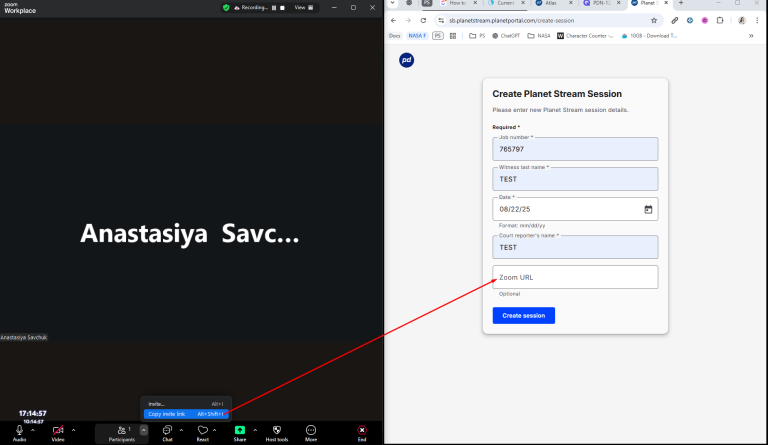
Start the Zoom meeting in the desktop app (not web or mobile).
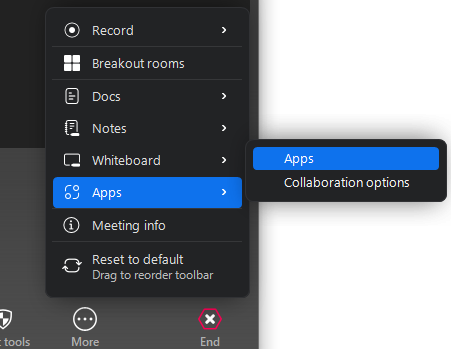
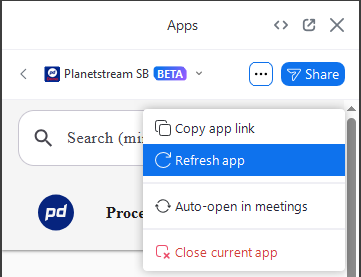
In the meeting, open the Apps tab and launch Planet Stream.
The Planet Stream popout opens, showing the linked Planet Stream session with real-time transcription.
Please note: Zoom participant names appear in the Planet Stream session as viewers.
Sharing the app with participants:
After you open the app, it is automatically shared with new meeting participants.
To share manually:
In the meeting, open Apps → Planet Stream.
Click “Share” in the top right of the app panel.
Choose Specific participants or All participants.
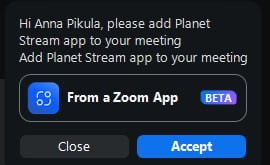
Participants can accept the in-meeting prompt to open the app on their device.
Removing the app
You can revoke access at any time:
Login to your Zoom account and navigate to the Zoom App Marketplace.
Click Manage > Added apps, or search for the Planet Stream app.
Click on the Planet Stream app.
Click Remove. This removes the app’s access going forward.
Troubleshooting
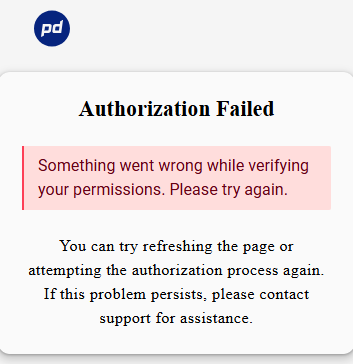
Error message:
“Something went wrong while verifying your permissions. Please try again.”
How to fix:
Ensure a Planet Stream session is running and the correct Zoom meeting invitation link (including “pwd=” if required) was used in the Zoom URL field on the “Create Session” page. Then refresh the app tab inside Zoom.
End any previous Planet Stream sessions in the web app using End Transcription (only one session can run at a time).
Make sure you’re using the Zoom desktop app (not web or mobile).
Do not use an old Zoom meeting invitation link for a new Planet Stream session. For each newPlanet Stream session, you must use a new Zoom meeting invitation link.
If needed, uninstall and reinstall the app from Zoom App Marketplace → Manage → Added apps, then re-authorize.
Additional troubleshooting:
If the app is not visible in the meeting:
Use the desktop client and update Zoom to the latest version.
If the participants don’t see the shared app:
Click Share in the app panel and select the participants (or All participants).
The Zoom meeting invitation link used to create the session.
The time of the issue.
Privacy Policy and Terms of Service for the Planet Depos Zoom App
Effective Date: 01/01/2025 Last Updated: 09/02/2025
Planet Depos (“we,” “our,” “us”) is committed to protecting your privacy and ensuring the confidentiality of all information entrusted to us. This Privacy Policy describes how our Zoom-integrated application (“App”) collects, uses, stores, and shares personal information. It also explains your rights regarding your data. Our policy complies with all of Zoom’s API licenses and terms of use. In order to create effective user experiences, we leverage visual elements in graphic design to enhance the functionality and aesthetics of our App. These design choices are critical as they contribute to user engagement and overall satisfaction. By carefully integrating these visual elements, we aim to ensure that our platform remains intuitive and accessible for all users.
1. Information We Collect
When you use the App in connection with Zoom, we may collect the following categories of data:
User Profile Information
Name, email address, and Zoom account details (e.g., user ID).
Meeting Metadata
Meeting ID, topic, start and end times, and participant information.
App Usage Data
Logs of actions taken within the App, error reports, and diagnostic information to ensure service reliability.
Transcripts
The App generates transcripts of depositions or proceedings. These transcripts may contain information shared by participants during the session. While we do not intentionally collect sensitive information (such as financial data, biometric identifiers, or health records), if participants disclose such information during a proceeding, it may appear in the resulting transcript.
2. How We Use Your Information
We use the data collected through the App to:
Provide and improve the App’s core functionality
Authenticate and authorize users through Zoom’s OAuth 2.0 system
Maintain security and prevent unauthorized access
Provide customer support and respond to inquiries
Conduct troubleshooting and system performance monitoring
Comply with legal and regulatory obligations
We never use your information to train AI models or for purposes unrelated to providing App functionality.
3. Data Sharing and Disclosure
We do not sell or rent your personal information. We may share limited information under the following conditions:
With Zoom: To enable the App’s integration in compliance with Zoom’s API usage policies.
With Service Providers: Trusted third-party vendors who provide hosting, security monitoring, or support services under confidentiality agreements.
For Legal Compliance: When required to comply with applicable laws, regulations, legal processes, or enforceable government requests.
4. Data Storage and Security
We safeguard all personal data using enterprise-grade security aligned with the NIST Cybersecurity Framework, HIPAA, and SOC2, including:
Encryption of data in transit and at rest
Multi-factor authentication (MFA) for administrative access
24/7 security monitoring and intrusion detection
Regular vulnerability assessments, penetration tests, and independent audits
Secure Software Development Lifecycle (SSDLC), including static and dynamic code analysis (SAST/DAST)
Access to data is strictly limited to authorized personnel with a legitimate business need.
5. Data Retention
We retain personal information only as long as necessary to fulfill the purposes described in this Policy or as required by law.
Zoom account information is retained while your account is connected to our App.
Meeting metadata and usage logs are retained for six months as part of our service records and auditing processes, unless deletion is requested explicitly by the user, where applicable.
Transcripts (Sensitive Data):
Authenticated users can access transcripts through our website for 24 hours following availability.
After 24 hours, user access to transcripts is removed.
Transcripts are then retained by Planet Depos as part of our final transcription process and stored indefinitely in a secure environment.
Users may request deletion of their transcripts at any time. Upon such a request, we will securely and permanently delete the associated files from our systems.
6. Your Rights
Depending on your jurisdiction, you may have the following rights:
Access: Request a copy of the data we hold about you
Correction: Update or correct inaccuracies
Deletion: Request deletion of your personal data
Restriction: Limit how your information is processed
Portability: Request a copy of your data in a portable format
Objection: Object to certain data uses, such as marketing (we do not use your data for marketing)
California residents (CCPA) and EU/UK residents (GDPR) have additional specific rights, which we honor as applicable.
7. International Data Transfers
All data collected and processed by our App is stored and maintained within the United States. We do not transfer personal information outside of the United States.
8. Children’s Privacy
Our App is not directed to children under 16, and we do not knowingly collect data from them.
9. Changes to This Policy
We may update this Privacy Policy from time to time to reflect changes in legal, technical, or business developments. The “Last Updated” date at the top will be revised accordingly.
10. Contact Us
For questions or concerns about this Privacy Policy or our data practices, please contact us: